
Your users have opinions about your app. The question is whether those opinions end up as useful feedback in your inbox or as one-star reviews on the App Store. Net Promoter Score (NPS) is one of the simplest ways to find out how people feel about your app, and to act on it before they churn.
This guide walks you through NPS from the ground up: what it is, when to ask, what to do with the answers, and how to wire it all up in your iOS app.
What is NPS?
Net Promoter Score is a single-question survey: “How likely are you to recommend this app to a friend or colleague?” Users pick a number from 0 to 10. Based on their answer, they fall into one of three groups.
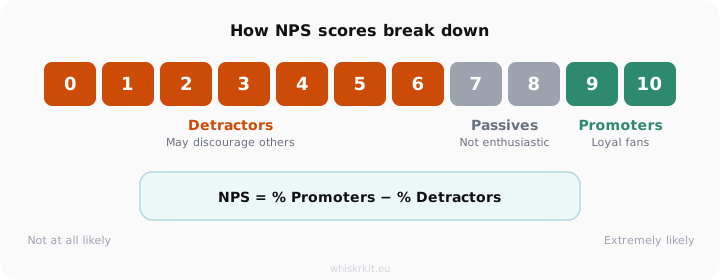
Detractors (0 to 6) are unhappy and may actively discourage others from using your app. Passives (7 to 8) are satisfied but not enthusiastic. They will not go out of their way to recommend you. Promoters (9 to 10) are your loyal fans. They tell friends about your app and leave good reviews.
The formula is simple: take the percentage of promoters, subtract the percentage of detractors, and you get your NPS. The score ranges from -100 to +100. Anything above 0 means you have more fans than critics. Above 30 is considered strong. Above 50 is excellent, and above 70 puts you among the best in the industry.
Fred Reichheld introduced NPS in 2003 while working at Bain & Company. Since then, it has become one of the most widely used customer loyalty metrics. Two-thirds of the Fortune 1000 use it. But the real value for app developers is not the number itself. It is what happens after the score.
Why in-app NPS beats email surveys
If you have ever sent a post-purchase email asking for feedback, you know the response rates are low. Email NPS surveys typically get 10 to 15 percent response rates. In-app surveys, on the other hand, regularly hit 30 percent or higher. Some developers report two to ten times more responses after moving their NPS survey from email into the app.
The reason is timing. When someone is already using your app, they are in context. Their experience is fresh. They are more likely to give an honest, quick answer than when they open an email three days later and try to remember how they felt.
For iOS developers there is another big advantage: you can act on the score immediately. A promoter who just gave you a 10 is the perfect person to show an App Store review prompt. A detractor who gave you a 3 is the perfect person to route to your internal feedback channel, before they take that frustration to a public review.
When to show the NPS prompt
Timing matters more than most people think. If you already read our guide on feedback prompt timing, you know the core principle: never interrupt, always wait for the right moment.
For NPS specifically, a few rules work well.
Show the survey after the user has experienced real value. That means not on first launch, not during onboarding, and not before they have had a chance to form an opinion. A good baseline is to wait until someone has completed at least three sessions.
Trigger the prompt after a completed action, not during one. If your app is a task manager, show it after someone checks off a task. If it is a fitness app, show it after a completed workout. The moment of accomplishment is when people feel most positive, and most willing to give feedback.
Do not ask too often. Once every 90 days per user is a solid default. Asking more often than once per month will annoy people and skew your results. If a user dismisses the survey, wait at least a week before trying again.
And never show NPS during error screens, loading states, or checkout flows. Those are moments where any interruption feels hostile.
What to ask after the score
The number alone tells you how someone feels. The follow-up question tells you why. A good NPS survey is exactly two questions: the score and one follow-up. Every extra question you add reduces your response rate by five to fifteen percent.
The follow-up should change based on the score category.
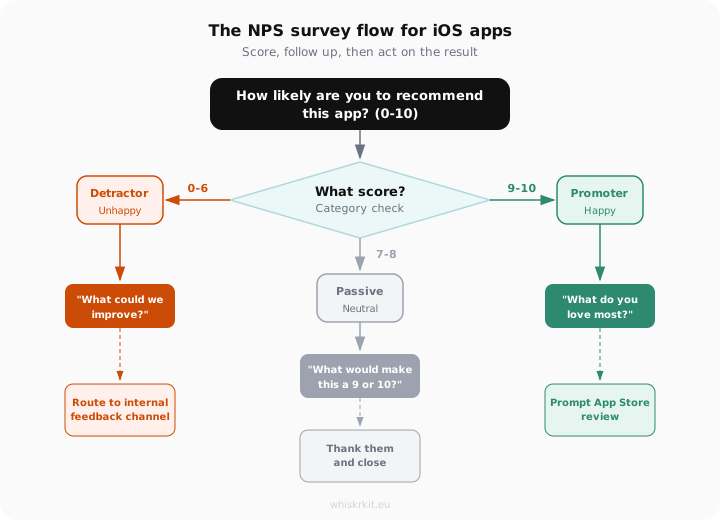
For detractors (0 to 6), ask “What could we improve?” These users are unhappy, so give them a clear and short way to tell you what went wrong. Keep the text field short. A single sentence is often more useful than a paragraph.
For passives (7 to 8), ask “What would make this a 9 or 10?” This question is specific enough to surface what is missing. Passives are close to becoming fans. They just need a nudge.
For promoters (9 to 10), ask “What do you love most?” This tells you what to double down on. It also puts the user in a positive frame of mind, which sets up the next step perfectly.
Routing promoters to the App Store
This is the part most NPS guides skip, and it is one of the most valuable things you can do on iOS.
When a user gives you a 9 or 10 and tells you what they love, they are at peak enthusiasm. That is exactly when you want to ask them to leave an App Store review. Apple provides SKStoreReviewController.requestReview() for this. It shows a native review dialog that users already trust.
The key is to only do this for promoters. If you show the App Store review prompt to everyone, you will get a mix of good and bad reviews. But if you filter for scores of 9 and 10, you are selectively asking your happiest users to share their opinion publicly. Your detractors already told you their frustrations through the follow-up question. Those go to your internal feedback channel where you can actually act on them.
This single technique, routing detractors inward and promoters outward, is why in-app NPS is so much more powerful than a generic review prompt. You are turning the same survey into both a product improvement tool and a growth lever.
Keep in mind that Apple limits SKStoreReviewController to three prompts per 365-day period per user. So do not waste them. Combine NPS score filtering with session counting to make each prompt count.
What a good NPS score looks like
Once you start collecting responses, you will want to know how your score compares. Industry benchmarks for SaaS and consumer apps generally range from 30 to 60. A score below 0 means you have more detractors than promoters and need to investigate. A score between 0 and 30 is a decent starting point. Anything above 50 means you are doing very well.
Some well-known benchmarks: Apple scores between 60 and 72, Spotify lands around 45 to 60, and Netflix sits between 50 and 64. These are large companies with millions of users, so do not be discouraged if your early scores are lower. What matters more than the absolute number is the trend. If your NPS is going up over time, you are moving in the right direction.
A practical tip: do not obsess over the score with a small sample size. Your first 20 to 30 responses will be noisy. Wait until you have at least 50 responses before drawing conclusions, and look at the follow-up answers as much as the number itself.
Adding NPS to your iOS app with WhiskrKit
You can build all of this from scratch, and the patterns above give you a solid foundation. But if you would rather not maintain your own survey UI, trigger logic, cooldown tracking, and response backend, WhiskrKit handles it for you.
WhiskrKit is a native iOS SDK built entirely in Swift. You add it through Swift Package Manager and configure your surveys from a web dashboard. The NPS survey type is built in, including the 0-10 scale, conditional follow-up questions, and configurable trigger rules like session count thresholds and cooldown periods.
Responses are collected through a lightweight API and visible in the dashboard with NPS calculation, trend charts, and the actual text feedback organized by score category. The SDK is designed to be small and stay out of your way. No WebViews, no heavy dependencies, no UIKit wrappers.
If you are interested in trying it out, WhiskrKit is currently in beta and looking for early testers. You can join the waitlist on whiskrkit.eu to get access.
WhiskrKit is currently available for iOS, with Android and cross-platform support planned.