
You built something people use. Now you want to know what they think. So you add a feedback prompt, and your ratings drop, your reviews get angrier, and your uninstall rate ticks up.
This is one of the most common mistakes in iOS development, and it almost always comes down to one thing: timing.
Showing a feedback prompt at the wrong moment doesn’t just give you bad data. It actively damages the experience your users came for. This article walks through what the research says, what Apple’s platform rules require, and how to build a timing system that actually works.
Why Timing Is the Most Overlooked Factor
Most developers think about what to ask. Far fewer think about when to ask it.
This is a mistake, because the moment you interrupt a user determines almost everything: whether they respond, how honest they are, and whether they resent you for asking.
Research shows that people give 40% more accurate feedback immediately after completing a meaningful action compared to being asked 24 hours later.¹ Event-based surveys sent within two hours of an interaction also see 32% more completions and score 40% higher on actionability than delayed ones.¹
In other words, context is everything. A user who just successfully booked a trip, finished a workout, or completed onboarding is in a completely different mental state than one who just opened the app and is trying to get something done.
The Four Types of Triggers, and When to Use Each
1. Event-Based Triggers (Best Option)
This is the gold standard. You show a prompt right after a user completes something meaningful, a purchase, a checklist, a key feature interaction.
Why it works: the user just experienced value. Their perception of the app is at its most positive, and their memory of the interaction is fresh. This is the highest-quality signal you can collect.
Examples:
- After completing onboarding → ask about the setup experience
- After using a specific feature 3 times → ask about that feature
- After a successful transaction → ask about the overall experience
2. Session-Count-Based Triggers
Instead of firing on a specific action, you wait until a user has opened the app a certain number of times. This ensures you’re only asking people who have actually formed an opinion.
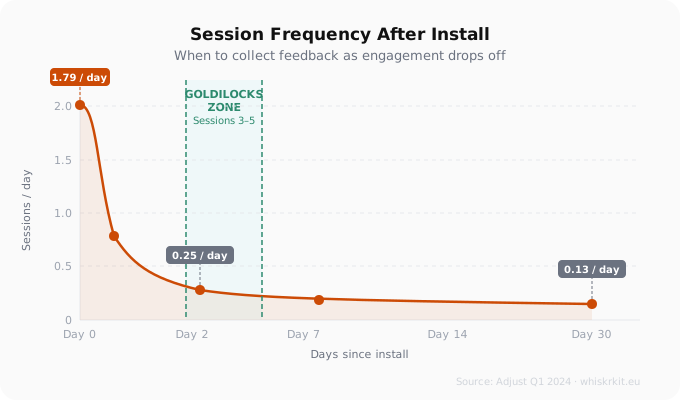
The research consistently points to 3–5 sessions as the “goldilocks zone”, enough engagement to have a real impression, but not so much that the user has become completely habitual and lost awareness of their experience.²
3. Time-Based Triggers
Waiting a set number of days before showing a prompt. This is simple to implement but the weakest of the three approaches, because time alone doesn’t tell you whether the user has actually engaged with your app.
If you use time-based triggers, combine them with a session minimum. “7 days since install AND 3+ sessions” is much better than “7 days since install” alone.
4. Behaviour-Based Triggers
More advanced: targeting users based on specific usage patterns. Power users of a certain feature, users who went idle for two weeks and came back, users who reached a certain milestone. This requires more instrumentation but gives you the most relevant segments to ask.
What Survey Fatigue Actually Looks Like in Data
Survey fatigue is real and measurable. An analysis of over 1,300 in-app surveys covering more than 50 million views found that the average response rate for in-app surveys on mobile is around 36%, significantly higher than email surveys (6–15%) or passive feedback buttons (3–5%).¹
But that number assumes you’re doing things right. The same research shows response rates drop measurably when users are surveyed more than once every 30 days, and that action-triggered surveys outperform random timing by about 30%.¹
Length also matters more than most developers expect. Surveys over 30 questions see respondents spend nearly half as much time per question compared to shorter ones, they start rushing through and stop thinking.³ And 48% of users say they’re only willing to spend 1–5 minutes on a feedback survey.³
The practical implication: keep prompts short (4–5 questions is enough on mobile), and control your frequency aggressively.
Apple’s Hard Limits on Review Prompts
If you’re using .requestReview(in:), you need to understand the platform constraints before you build your timing logic around them.
Apple allows a maximum of 3 review prompts per user, per app, per 365 days.⁴ Even within that limit, Apple can suppress the prompt entirely at their discretion. When you call the API, it is a request, not a command, there’s no callback, no return value, no way to know if it was shown or dismissed.⁴
A few things developers commonly miss:
- In Xcode debug builds, the prompt always appears. In TestFlight, it never appears. Only production App Store builds reflect Apple’s actual logic.⁴
- Users can disable all in-app review prompts system-wide in Settings → App Store.
- The parameterless SKStoreReviewController .requestReview() was deprecated in iOS 14. You should be using .requestReview(in: windowScene) instead, which requires a UIWindowScene.
- Custom review dialogs are banned under App Store Review Guidelines Section 1.1.7. You can include a “Rate Us” button that links to the App Store page, but you cannot build your own star rating UI that feeds into App Store ratings.⁴
Apple’s own guidance for when to call the API: after meaningful task completion, after demonstrated multi-session engagement, and at natural pause points, never on launch.
When You Should Never Show a Prompt
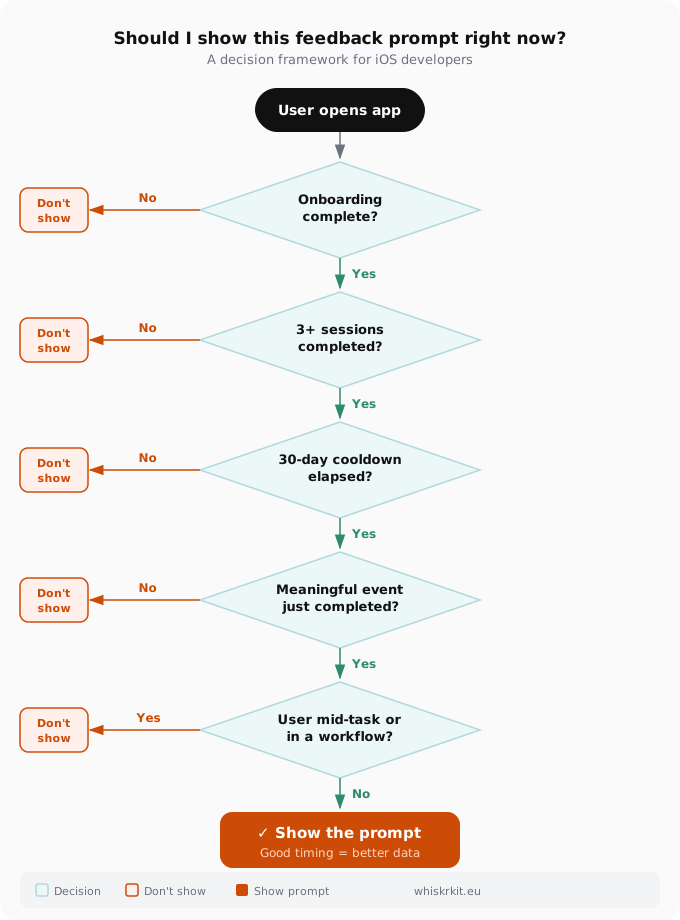
Just as important as knowing when to ask is knowing when not to. The following moments should always be suppressed, regardless of whether a user is technically eligible:
- On first launch or first login, the user has no opinion yet and opened the app to do something
- During onboarding, interrupts a critical learning moment
- Mid-task or during active workflows, biases responses toward frustration and kills user flow
- During checkout or payment flows, creates real abandonment risk
- Immediately after an error or crash, frustration peaks make feedback unreliable
- When another prompt is already visible, stacked overlays double user annoyance⁵
Nielsen Norman Group’s research puts this clearly: modal dialogs unrelated to a user’s current goal “are perceived as annoying and can diminish trust.”⁵ In usability testing, NNGroup documented users abandoning tasks entirely after encountering consecutive popups, one participant literally threw his phone across the table.
The core principle: never show a prompt before the user can glean value from what they came to do.
A Practical Framework: The Three Layers
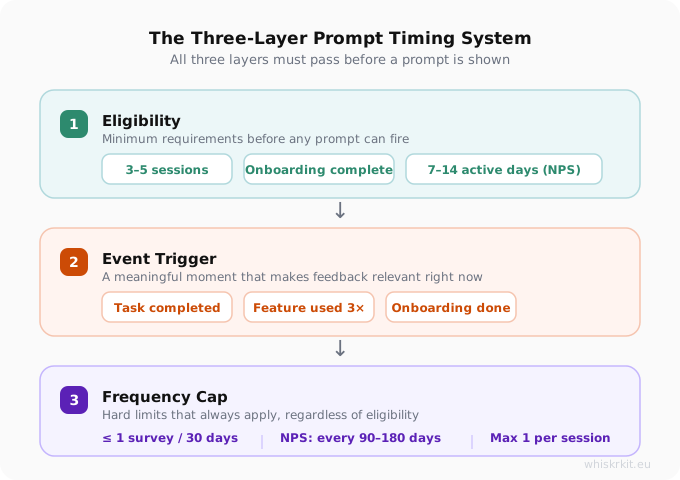
Combine these three layers to build a timing system that respects your users and gives you clean data.
Layer 1: Minimum Eligibility
Before any prompt can fire, a user must meet a baseline:
| Feedback Type | Minimum Threshold |
|---|---|
| General / CSAT | 3+ sessions, onboarding complete |
| Feature feedback | 1–3 uses of that specific feature |
| NPS | 7–14 active days, 5+ sessions |
| App Store review | 3+ sessions, no recent crashes |
Layer 2: Event Trigger
The prompt should fire on a specific event, not just “eligibility met.” Pick meaningful moments that match the type of feedback you’re collecting. Asking about the overall app experience right after a user completes their first onboarding checklist is good timing. Asking on launch is not.
Layer 3: Frequency Cap
Even if a user is eligible and a trigger fires, enforce cooldowns:
- Global cap: no more than 1 survey per user per 30 days across all survey types
- NPS: no more than once every 90–180 days
- App Store review prompt: respect Apple’s 3-per-year hard limit; target once per major version
- Never two prompts in a single session
One Often-Missed Insight
Here’s a finding worth sitting with: unhappy customers who are asked for their opinion are 400% more likely to return to the app.⁶
When timed correctly, a feedback prompt isn’t just a data collection tool. It’s a signal to the user that you care about their experience. That signal has retention value, but only if you ask at a moment when they can actually reflect, not when you’re interrupting something they were trying to do.
Treat your users’ attention as a finite resource. Spend it carefully, and they’ll reward you with honest answers, and with continued use.
Summary Checklist
- ✅ Trigger on meaningful events, not random time intervals
- ✅ Require minimum session count (3–5) before any prompt fires
- ✅ Enforce a 30-day global cooldown per user
- ✅ Keep surveys to 4–5 questions maximum
- ✅ Never prompt on launch, mid-task, or during errors
- ✅ Remember Apple’s 3-prompt annual cap and design within it
- ✅ Add suppression rules for checkout flows, onboarding, and active workflows
- ✅ Target engaged users, power users give better signal than dormant ones
Sources
Sources
- Refiner, In-App Survey Response Rate Benchmarks 2025
- Adjust, Mobile App Trends Report Q1 2024
- SurveyMonkey, Does adding one more question impact survey completion rate?
- Apple Developer Documentation, StoreKit Requesting App Store Reviews
- Nielsen Norman Group, Modal & Interrupt Research
- Alchemer, App Ratings Prompts: When and How to Ask for a Mobile App Rating