
If you want to ask your app users a question at the right moment, you will quickly run into SurveyMonkey. It is one of the best-known survey platforms in the world, and it offers a free mobile SDK for iOS and Android. So why look for a SurveyMonkey mobile SDK alternative?
We built WhiskrKit, so we are not neutral. That is exactly why we tried to keep this comparison honest: every claim about SurveyMonkey comes from its own documentation and pricing page, listed at the bottom. And we will tell you when SurveyMonkey is the better choice, because sometimes it is.
The quick answer
- Choose SurveyMonkey if you already use it across your company, need advanced research and analysis features, and run surveys in many channels besides your app.
- Choose WhiskrKit if your surveys live inside a mobile app, you want them to look and feel native, and your data has to stay in the EU.
- The deal-breaker for many European teams: SurveyMonkey’s mobile SDK is not available for accounts that store data in its European data center.
| SurveyMonkey mobile SDK | WhiskrKit | |
|---|---|---|
| Rendering | Web survey loaded in the app | Native UI: Swift on iOS, Kotlin on Android |
| Platforms | iOS, Android | iOS, Android, React Native, Flutter |
| Weak or no connection | Survey is not shown without a connection | Submissions are cached and sent when the connection returns |
| EU data storage | SDK not available for EU data center accounts | EU hosted, response data not routed through US subprocessors |
| Installation | Swift Package Manager, CocoaPods, Maven Central | Swift Package Manager, Maven Central, npm, pub.dev |
| Latest iOS release | v2.1.2 (June 2024) | Actively developed, currently in beta |
| Survey types | Anything you can build in SurveyMonkey | NPS, star rating, thumbs up/down, open text, multiple choice |
| Targeting | Time intervals and user actions | Sessions, install age, app version, locale, platform, sample rate, day of week |
| Pricing | Team plans from $30 per user per month, minimum 3 users, billed annually | Free plan, paid plans from €29 per month, priced per app and monthly responses |
| Templates and analysis | Very extensive, 400+ templates | Focused on in-app use cases |
| Other channels (email, web, links) | Yes | No, in-app only |
We last checked SurveyMonkey’s documentation and pricing on 6 November 2026.
How each tool works inside your app
SurveyMonkey. You design a survey on surveymonkey.com, create a Mobile SDK collector and get a survey hash. Your developer adds that hash to the app. When the survey is triggered, the SDK loads the SurveyMonkey survey page inside your app. That page is mobile responsive and can be themed to roughly match your brand, but it is a web page, so the device needs an internet connection to show it.
WhiskrKit. You create a survey in the WhiskrKit dashboard and the SDK renders it with native components: Swift on iOS, Kotlin on Android, and React Native and Flutter wrappers that drive those same native SDKs. Surveys appear as a sheet, a toast or a full-screen cover, use your own colors and fonts, and support Dynamic Type and VoiceOver. Who sees a survey and when is set with targeting rules in the dashboard, and changes take effect without an app update.
The difference sounds small on paper. In practice, it is the difference between a survey that feels like your app asking a question and one that feels like a pop-up from somewhere else. And that feeling affects whether people bother to answer, as we saw in What Is a Good In-App Survey Response Rate?
The comparison in detail
1. Native experience vs embedded web survey
SurveyMonkey’s SDK shows a web page inside your app. Its Android SDK, for example, presents surveys through an activity or fragment and returns the response as JSON. This works, and it lets you reuse surveys you already built on SurveyMonkey. The trade-off is that a web view never fully matches your app’s typography, animations, accessibility settings or loading speed.
WhiskrKit renders every question with native components. On iOS the survey supports Dynamic Type and VoiceOver the same way the rest of your app does, and you can offer the OpenDyslexic font for readers with dyslexia. You choose how it appears: as a sheet, a small toast or a full-screen cover. Want to see the difference before you integrate anything? The Playground demo app in our iOS SDK repository lets you try every survey type and theme.
2. EU data storage and GDPR
This is the point many European teams discover too late. SurveyMonkey offers a European data center, which its pricing page lists as part of the Enterprise plan. But according to its own help center, the Mobile SDK is not available for accounts that store data there. In other words: if your company chose EU data storage for GDPR reasons, you cannot use SurveyMonkey’s in-app surveys.
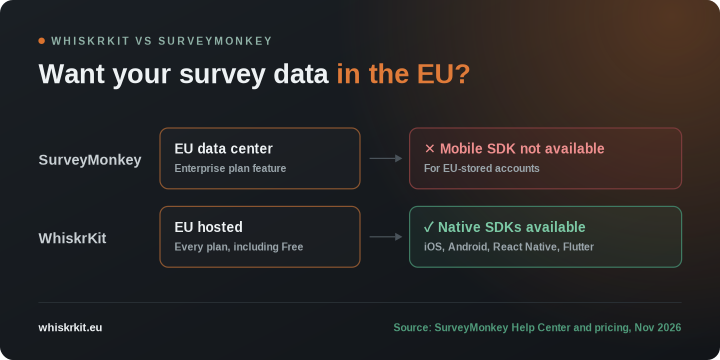
WhiskrKit is built and hosted in the EU. The backend runs on EU-based infrastructure, and survey response data is not routed through US-based subprocessors. A Data Processing Agreement is available for customers who need one. And because your data is yours, you can export all responses as CSV or JSON from the dashboard at any time. That keeps you free to analyse them elsewhere, or to leave.
We will not claim WhiskrKit makes you GDPR compliant on its own: that also depends on what you ask and how you use the answers. But for apps in health, fitness, finance or the public sector, EU hosting removes the biggest discussion with your privacy officer.
3. Built for developers
SurveyMonkey’s SDK is one feature of a much larger platform. You can see that in the release history: the latest iOS release, v2.1.2 from June 2024, added a privacy manifest and threading fixes. It supports Swift Package Manager, but the integration still revolves around delegates and view controllers.
WhiskrKit is the product, not a side feature. The iOS SDK is written in Swift, the Android SDK in Kotlin, both without external dependencies, and the React Native and Flutter packages drive those same native SDKs. In SwiftUI, adding a survey looks like this:
import WhiskrKit
@mainstruct MyApp: App {    init() {        WhiskrKit.shared.initialize(apiKey: "your-api-key")    }
    var body: some Scene {        WindowGroup { HomeView() }    }}
struct HomeView: View {    var body: some View {        Text("Welcome")            .whiskrKitSurvey(identifier: "feature-feedback")    }}
The modifier checks the targeting rules you set in the dashboard, so your code stays the same when you change who sees the survey. On Android you install eu.whiskrkit:whiskrkit-android from Maven Central, on React Native react-native-whiskrkit, and on Flutter flutter_whiskrkit. See the quickstart for every platform.
4. Pricing model
SurveyMonkey’s team plans start at $30 per user per month, billed annually, with a minimum of three users. Responses above your yearly limit cost $0.15 each, and some SDK features, such as pulling response data into your app and sending custom variables, require a paid plan. If your whole company already pays for SurveyMonkey, adding the SDK costs nothing extra. If you only need in-app surveys, you pay for a lot of platform you will not use.
WhiskrKit pricing is based on the number of apps and survey responses, not on how many colleagues log in. There is a free plan with 1 app and 100 responses per month, and paid plans start at €29 per month for 3 apps and 2,500 responses. Only submitted surveys count as a response, and when you reach your limit, surveys pause until the next month. No surprise overage fees. Every plan includes all SDKs and every question type. See pricing; prices exclude VAT.
5. Where SurveyMonkey is clearly stronger
To be fair: SurveyMonkey has more than 400 ready-made templates, advanced analysis features, and it works for email, web and link surveys too. If you run market research or employee surveys besides your app feedback, one platform for everything has real value. WhiskrKit does not try to replace that. We focus on one thing: asking the right question inside your app, at the right moment.
When to choose SurveyMonkey, and when to choose WhiskrKit
SurveyMonkey is the better fit when:
- your organisation already pays for SurveyMonkey and wants all survey results in one place;
- you need advanced research features, large template libraries or survey channels besides your app;
- your data is stored in the US data center, where the SDK is supported, and that is fine for your users.
WhiskrKit is the better fit when:
- your surveys live inside an iOS or Android app, including React Native and Flutter apps;
- you want surveys that look and behave like the rest of your app;
- your data has to stay in the EU, or your SurveyMonkey account already uses the EU data center;
- you want pricing that does not grow with the number of people on your team.
Many teams end up using both: SurveyMonkey for research and email surveys, WhiskrKit for the moments inside the app. That is a perfectly good setup.
How WhiskrKit fits in
SurveyMonkey is an excellent all-round survey platform, and its mobile SDK is a convenient extra if you already live in that ecosystem. But it was never built primarily for apps: surveys load as web pages, need a connection, and the SDK is not available at all if you store your data in the EU.
WhiskrKit takes the opposite approach. It does one thing, in-app surveys, and does it natively, with your data in Europe. WhiskrKit is still a young product, and we are honest about that too: we work closely with every team that integrates it, and your feedback directly shapes what we build next.
Curious how it feels in your app? Try the Playground demo app, read the quickstart, or create an account and try it in your own app.
FAQ
Is the SurveyMonkey mobile SDK free?
The SDK itself can be used with any SurveyMonkey plan. Some features, like getting response data back in your app and collecting custom variables, require a paid plan.
Can I use the SurveyMonkey SDK with EU data storage?
No. SurveyMonkey’s help center states that the Mobile SDK is not available for accounts with data in its European data center. The same applies to its Canadian data center.
Does the SurveyMonkey SDK work offline?
No. The SDK needs an internet connection to load the survey. Offline users are not prompted.
Are SurveyMonkey in-app surveys native?
No. The SDK loads a SurveyMonkey web survey inside your app. You can theme it, but it is not built with native iOS or Android components.
What is a good SurveyMonkey mobile SDK alternative for European apps?
WhiskrKit is a native in-app survey SDK for iOS, Android, React Native and Flutter, built and hosted in the EU. It is designed specifically for asking questions inside mobile apps.
Can I use WhiskrKit and SurveyMonkey together?
Yes. WhiskrKit handles in-app surveys, and you can export responses as CSV or JSON to combine them with your other research.
Sources
- SurveyMonkey, Mobile SDK (Help Center)
- SurveyMonkey, Gather feedback in your app with the SurveyMonkey mobile SDK
- SurveyMonkey, Plans and Pricing
- SurveyMonkey, surveymonkey-ios-sdk on GitHub
- SurveyMonkey, surveymonkey-ios-sdk releases
- SurveyMonkey, surveymonkey-android-sdk on GitHub
- WhiskrKit, Documentation
- WhiskrKit, Pricing