
Open Google’s official Kotlin sample for the Play In-App Review API and read the comment sitting inside the completion listener. After telling you the flow has finished, it tells you the API “does not indicate whether the user reviewed or not”, or even whether the dialog was shown at all.
That is not an oversight. It is the design, and Google is being upfront about it. But it has a consequence that most Android teams only notice about six months in: the Play In-App Review API is a rating collection mechanism, not a feedback channel. If it is the only thing you have wired up, you are shipping blind and your dashboard will never show you that you are.
This post covers what the API genuinely cannot do, why the ratings it does produce are a skewed sample, and how to build the missing half of the loop as a native survey in Jetpack Compose.
Four things the API will not do
All four come from Google’s own documentation rather than from developer folklore.
It returns no result. The launchReviewFlow completion listener fires no matter what happened. User submitted five stars, user dismissed the sheet, the dialog never rendered: same callback, no distinguishing information. Google’s guidance is to continue your normal app flow regardless, and to not inform the user or change your flow even when an error occurs.
The quota is invisible. Play enforces a time-bound quota on how often a given user can see the dialog. Calling the method more than once in a short period, which the docs illustrate with a window of less than a month, may simply display nothing. The exact value is documented as an implementation detail that Google can change without notice, so you cannot pin your logic to it or detect when you have hit it.
You cannot put it behind a button. This follows from the quota. Because the user may already have exhausted it, Google says directly that you should not use a call to action such as a button to trigger the API, since the flow may not appear and you have then built a button that visibly does nothing. For that case the documented alternative is to deep link to the Play Store listing instead.
You cannot ask a question first. This is the one that catches out developers coming from iOS. Google’s guidelines state your app must not ask the user any question before or while the rating card is presented. That explicitly includes opinion questions such as “Do you like the app?” and predictive ones such as “Would you rate this app 5 stars?”. The familiar two-step pre-prompt, where you check the mood first and only show the store rating to people who answered warmly, is not a pattern you can use on Android.
Put those together. You have a dialog you cannot reliably trigger, cannot precede with a question, cannot measure, and cannot repeat often. That is fine for what it is. Google built it to collect public ratings with minimal friction, and it does that well. It was never built to be an instrument.
The ratings you do get are a skewed sample
Even setting the API aside, the number at the top of your Play listing is not a measurement of how your users feel.
Online ratings follow what researchers call a J-shaped distribution: a large cluster at five stars, a smaller cluster at one star, and very little in between. Hu, Pavlou and Zhang set out to test why, and ran a controlled study in which participants rated a product regardless of whether they felt like it. The distribution flattened out almost completely. Roughly 3 percent gave the top score and about 7 percent gave the lowest, with most people landing in the middle where public review distributions are nearly empty.
Two self-selection effects drive the gap. Acquisition bias means the people using your app already skewed positive before they installed it. Under-reporting bias means that among those users, only the ones with strong opinions bother to say anything. The people in the middle are the ones who quietly stop opening the app.
So your Play rating describes the tails. It tells you very little about the majority, which is exactly where churn happens. That gap is the whole argument for running your own feedback loop alongside the store, and it is the reason feedback data gets more valuable the longer you collect it, which we covered in why in-app feedback compounds.
Run the two jobs separately
The mistake is treating store ratings and user understanding as one system with a branch in the middle. They are two jobs and they need two mechanisms.
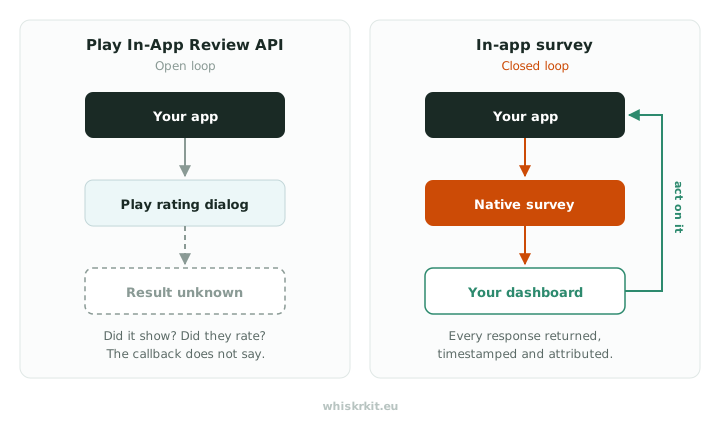
Job one is public ratings. Use the Play In-App Review API for this, on its own schedule, exactly as Google intends. Pick a moment after the user has clearly got value from the app, fire it, and ignore the result because you have no choice.
Job two is understanding what your users actually think. This is a survey you own, running on its own schedule, where you see every response.
Keep them independent, and do not make one conditional on the other. On Android the constraint is stricter than the general debate about review gating, because you may not ask a qualifying question before or during the rating card at all. Google’s separate policy on user ratings, reviews and installs also prohibits inflating ratings through incentivised or fraudulent means. The safe and honest pattern is the simple one: two triggers, no branching between them, no reward attached to either.
Building the survey half in Compose
Here is what job two looks like with WhiskrKit. The Android SDK is MIT licensed, published to Maven Central, and renders as real Compose, not a WebView inside your app.
Add the dependency. It needs minSdk 26 and Compose Material 3.
dependencies { implementation("eu.whiskrkit:whiskrkit-android:0.1.3")}Initialize once in your Application:
class MyApplication : Application() { override fun onCreate() { super.onCreate() WhiskrKit.initialize(context = this, apiKey = "your-api-key") }}Then add the host near the root of your composition, inside your theme. Every survey renders here, whichever way it gets triggered.
setContent { MyAppTheme { WhiskrKitHost { AppContent() } }}That is the setup finished. From there you have three ways to trigger a survey, and the choice matters more than the code does.
Let the backend decide when. Place the composable on a screen and WhiskrKit checks eligibility against the rules you set in the dashboard, things like session count, time since last prompt, and what share of your audience to sample. Nothing appears if the user does not qualify.
@Composablefun HomeScreen() { WhiskrKitSurvey(identifier = "post-purchase-feedback") // screen content}Pick the moment yourself, keep the targeting server side. Useful when you know the right instant, such as the end of a flow, but you still want the eligibility rules to apply.
WhiskrKit.checkAndPresent(surveyId = "checkout-completed")Present it unconditionally. For a feedback entry point in your settings screen, where the user asked for it and no eligibility check makes sense.
Button(onClick = { WhiskrKit.present(surveyId = "general-feedback") }) { Text("Give feedback")}Notice that the third option is the one Google tells you not to build with the review API. With a survey it is completely fine, because you control the presentation and it will always appear.
Theming and accessibility, which is where most survey SDKs fall over
Theming is the visible problem. WhiskrKit derives its appearance from your MaterialTheme with no configuration, including dark mode and dynamic color, and you override only what you want to change:
WhiskrKitHost( theme = WhiskrKitTheme( button = WhiskrKitTheme.ButtonTheme( primary = WhiskrKitTheme.ButtonAppearance.Variant( WhiskrKitTheme.ButtonVariant( backgroundColor = MyBrand.accent, textColor = Color.White, cornerRadius = 24.dp, ), ), ), ),) { AppContent() }Accessibility is the invisible problem, and it is the reason the WebView approach is worse than it looks. A survey rendered in a web view has to reimplement everything the platform gives you for free, and it usually reimplements it badly.
Two things to check in any Android survey component, including ours:
TalkBack grouping. By default every low-level composable that sets a semantics property gets its own focus stop, which turns a rating scale into eleven separate swipes. Compose solves this with Modifier.semantics(mergeDescendants = true), and modifiers like clickable and toggleable apply it already. A survey question should read as one coherent element with a clear state description, not as a pile of fragments.
Font scaling at 200 percent. Since Android 14 the system scales text up to 200 percent using a nonlinear curve, so small text grows much faster than large text. Anything sized in sp gets this automatically, but line heights defined in dp will not scale and your text will overlap. This is the single most common way a survey sheet breaks, and you will never see it unless you turn the setting on and look.
What to actually ship
Wire up the Play In-App Review API. It costs almost nothing and public ratings still matter for install conversion. Just do not expect it to report back.
Then run a separate in-app survey on your own trigger, with a question you can act on, and read every response. Two independent mechanisms, no branching, no gating. That is the compliant version and it is also the version that tells you something.
If you are on iOS as well, the equivalent guidance is in how to implement NPS in your iOS app, and when to show a feedback prompt covers the timing question for both platforms.
WhiskrKit is in public beta and free to try. The Android SDK is on Maven Central, the setup above is the whole integration, and the sample module runs every question type in mock mode without an API key. Join the waitlist if you want a key.
Sources
All Google documentation below was checked directly in July 2026.
- Google Play In-App Reviews API, Android Developers. Quotas, design guidelines, and the rules on when to request a review. Page last updated 30 January 2026.
- Integrate in-app reviews (Kotlin or Java), Android Developers. Source of the completion listener behaviour and the Play Core review library version. Page last updated 14 July 2026.
- User Ratings, Reviews, and Installs, Play Console Help. Policy on manipulated and incentivised ratings.
- Hu, N., Pavlou, P. A., and Zhang, J., Overcoming the J-Shaped Distribution of Product Reviews, Communications of the ACM, 52(10). Source of the acquisition and under-reporting bias framing and the controlled-rating figures.
- Android 14 features and APIs overview, Android Developers. Nonlinear font scaling to 200 percent and the
spline height guidance. - Merging and clearing and Semantics, Jetpack Compose accessibility documentation. Focus behaviour and
mergeDescendants.